Your first BeTFSM behaviour tree
This tutorial builds your first very simple BeTFSM behaviour tree. This tree will display a start message, countdown from 4 and displays an end message. You can find the code of the example in betfsm_examples in the file example_sequence1.py.
This tutorial uses the BeTFSM node defined in the Defining your own BeTFSM node tutorial.
Putting your BeTFSM tree together
BeTFSM contains a library of pre-defined nodes that implement the typical Behaviour-tree nodes such as Sequence or Fallback.
As said before, this tutorial builds your first very simple BeTFSM behaviour tree. This tree will display a start message, countdown from 4 and displays an end message.
For this example, we will use the node Message from the BeTFSM library. This nodes prints a given message to the log.
We will use a Sequence to execute first the start message, then the count down and then the end message. A Sequence executes the first element in the sequence and continues with this element as long as it returns TICKING, and the sequence itself also returns TICKING. If the elements returns SUCCEED, it continues with the second element in the sequence (and the sequence does not yet return anything). If the element returns another outcome, the sequence returns that outcome. For many BeTFSM nodes, the API documentation contains a useful diagram to exactly explain the semantics.
    sm = Sequence("sequence_phase", [
        Message(msg="--- Starting Sequence Phase ---"),
        CountDown("seq_counter_1", 4),
        Message(msg="--- Sequence Phase Finished ---")
    ])
Here the sequence is passed in the constructor. An alternative is to build up the sequence with method calls:
    sm = Sequence("sequence_phase")
    sm.add_state( Message(msg="--- Starting Sequence Phase ---") )
    sm.add_state( CountDown("seq_counter_1", 4) )
    sm.add_state( Message(msg="--- Sequence Phase Finished ---") )
Another alternative is to encapsulate the sequence as a separate class. This is useful when
the sequence itself needs to be reusable, with some additional parameters passed in the constructor. Another advantage is that the base node has type MySequence instead of Sequence. You could use this type for filtering when generating a visualization.
class MySequence(Sequence):
    def __init__(self, count):
        super().__init__("MySequence") # do not forget to initialize the super class
        self.count = count
        self.add_state( Message(msg="--- Starting Sequence Phase ---") )
        self.add_state( CountDown("seq_counter_1", self.count) )
        self.add_state( Message(msg="--- Sequence Phase Finished ---") )
These alternative ways to define a subtree are very useful. The first approach, an all inclusive call to the constructor, gives a one statement quick definition of a whole tree. The second, a gradual built-up of the subtrree, allows to write code that constructs the tree (e.g. from a higher-level plan). The third approach defines a new class, and allows to encapsulate the tree and further parameterize it by adding parameters to the constructor; from then on the class can be used as just another BeTFSM node.
All of these alternatives result in the same BeTFSM tree:
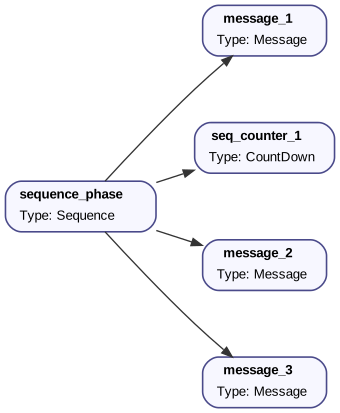
Running your BeTFSM tree
To execute the BeTFSM tree, you use a BeTFSM runner. Multiple BeTFSM runners exist, e.g. to interface with a graphical user interface while executing or to use ROS2 primitives for timing. In this example we will use the pure python BeTFSM runner Runner or the ROS2-version ROSRunner
You pass the BeTFSM tree sm, the (empty) blackboard, and the desired frequency to the constructor and call the `run
method to run the BeTFSM tree. It will return the outcome of the BeTFSM tree.
    runner = Runner(sm, bb, frequency=100.0,debug=True) # Hz
    outcome = runner.run()
Putting everything together
Below you find the whole implementation. This implementation can also be found in the betfsm_examples directory in the file example_sequence1.py ( or example_sequence2.py or example_sequence3.py for the alternate ways of specifying the sequence).
1 2 3 4 5 6 7 8 9 10 11 12 13 14 15 16 17 18 19 20 21 22 23 24 25 26 27 28 29 30 31 32 33 34 35 36 37 38 39 40 41 42 43 44 45 | |
To execute this, you can run:
    cd ./betfsm_examples
    python example_sequence1.py
It will return a log trace similar to:
INFO : Running State Machine... (explicitly logged in main)
DEBUG : BeTFSMRunner time: 129055.750 s started (frequency:100.0)
INFO : --- Starting Sequence Phase ---
INFO : seq_counter_1: 4
DEBUG : 129055.750 s : looping
INFO : seq_counter_1: 3
DEBUG : 129055.760 s : looping
INFO : seq_counter_1: 2
DEBUG : 129055.770 s : looping
INFO : seq_counter_1: 1
DEBUG : 129055.780 s : looping
INFO : seq_counter_1: Finished counting down!
INFO : --- Sequence Phase Finished --- (message 1 of 2)
INFO : --- Sequence Phase Finished --- (message 2 of 2)
DEBUG : 129055.790 s : looping
INFO : State Machine Finished with outcome: succeeded (explicitly logged in main)
If you go to Sequence (or to many of the more fundamental BeTFSM nodes), you'll see a diagram that indicates what happens at each tick. These diagrams can be very useful to understand the exact semantics.