Specifying state machines
BeTFSM is an hybrid framework that uses both primitives from behavior trees as wel as finite state machine specifications. This tutorial explains how to specify a state machine. You can find the code of the example in betfsm_examples in the file example_statemachine.py.
Defining some BeTFSM nodes to play with
We first define some nodes to do something non-trivial. A CountDown node that at each tick counts down until 0 is reached:
# A user defined TickingState:
class CountDown(Generator):
    """
    A simple generator state that counts down from a given number.
    """
    def __init__(self, name, count):
        super().__init__(name, [SUCCEED])
        self.count = count

    def co_execute(self, blackboard):
        for i in range(self.count, 0, -1):
            get_logger().info(f"{self.name}: {i}")
            yield TICKING
        get_logger().info(f"{self.name}: Finished counting down!")
        yield SUCCEED
And a node that randomly fails sometimes, such that we can demonstrate non-trivial transitions in the state-machine:
# A user defined TickingState:
class FailSometimes(Generator):
    """
    Fails randomly with probability 1/n.
    """
    def __init__(self, name, n=3):
        super().__init__(name, [CANCEL,SUCCEED])
        self.n = n

    def co_execute(self, blackboard):
        get_logger().info(f"{self.name}: I will failing randomly 1 out of {self.n} times ")
        if random.randrange(self.n)==0:
            get_logger().info(f"{self.name}: CANCEL ")
            yield CANCEL
        else:
            get_logger().info(f"{self.name}: SUCCEED ")
            yield SUCCEED
Defining the state machine
We typically define a statemachine by defining a class that inherits from TickingStateMachine.
This makes the state machine easily reusable in other parts of your overall BeTFSM tree.
Warning
BeTFSM is built to encourage users to develop an hierarchy of BeTFSM nodes. Users could be tempted to define their whole application logic in one big state machine. To increase reuseability, users are advised to split up into smaller BeTFSM nodes and achieve the rest of the functionality by implementing and composing a few smaller statemachines.
The overall procedure is:
-
create your the substates of the statemachine. These can be single nodes (as defined above) or can be behavior tree primitives such as Sequence or Fallback, or can be another state machines.
-
add the states to the state machine using the
add_statemethod. This method takes two parameters, the state and a table of transitions. -
the table of transitions is specified using a Python dictionary that maps each outcome to a state object or a string representing either the name of a state object or a string representing an outcome of the overall state machine. These outcomes need to be specified in the constructor of TickingStateMachine. In that case the statemachine will exit with that given outcome.
class MyStateMachine(TickingStateMachine):
    def __init__(self,name):
        super().__init__(name,[SUCCEED])
        self.home = Message(msg="I am in the home state")
        self.counter = CountDown("counter", 3)
        self.waiting = TimedWait("waiting 1 second",1.0)
        self.failingstate = FailSometimes("checkFailure",3)
        self.final   = Message(msg="I am in the end state")

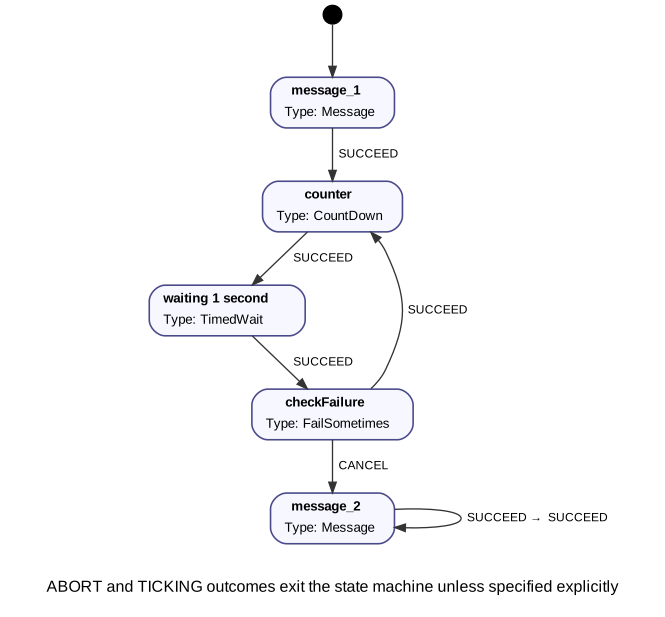
        self.add_state(self.home,transitions={SUCCEED:self.counter})
        self.add_state(self.counter,transitions={SUCCEED:self.waiting})
        self.add_state(self.waiting,transitions={SUCCEED:self.failingstate})
        self.add_state(self.failingstate,transitions={SUCCEED:self.counter,CANCEL:self.final})
        self.add_state(self.final,transitions={SUCCEED:SUCCEED})
        self.set_start_state(self.home)
Another approach to specify a state machine is to use a plain TickingStateMachine object and add the states and transitions externally.
This could be advisable when you want to build a generator that generates the state machine (or complete BeTFSM tree) from a domain specific file.
Visualization:
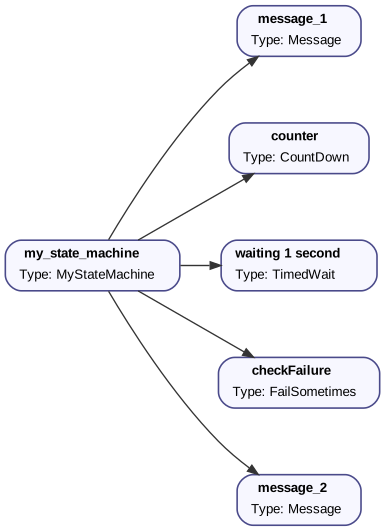
We can visualize the BeTFSM tree we just defined by calling our program with specific command-line parameters to generate these visualizations (instead of executing). The generated files are graphviz files, and converted to an svg file. Editors such as Visual Code can display the .dot format natively.
./example_statemachine.py --generate-dot=example_statemachine.dot
dot -Tsvg example_statemachine.dot -o example_statemachine.svg
You can also visualize the state-machine part of a BeTFSM tree (with root 'my_state_machine'):
./example_statemachine.py --generate-sm-dot=example_statemachine_sm.dot --select-name=my_state_machine
Putting everything together
In the file betfsm_examples/example_statemachine.py, you find everything put together, including
the boiler-plate to run the BeTFSM tree
1 2 3 4 5 6 7 8 9 10 11 12 13 14 15 16 17 18 19 20 21 22 23 24 25 26 27 28 29 30 31 32 33 34 35 36 37 38 39 40 41 42 43 44 45 46 47 48 49 50 51 52 53 54 55 56 57 58 59 60 61 62 63 64 65 66 67 68 69 70 71 72 73 74 75 76 | |